

curl --request POST \
  --url https://modelslab.com/api/v6/image_editing/img_mixer \
  --header 'Content-Type: application/json' \
  --data '
{
  "key": "<string>",
  "prompt": "<string>",
  "init_image": [
    "<string>"
  ],
  "negative_prompt": "<string>",
  "width": 123,
  "height": 123,
  "steps": 25,
  "guidance_scale": 10.5,
  "seed": 123,
  "samples": 0,
  "webhook": "<string>",
  "track_id": 123
}
'
import requests
url = "https://modelslab.com/api/v6/image_editing/img_mixer"
payload = {
"key": "<string>",
"prompt": "<string>",
"init_image": ["<string>"],
"negative_prompt": "<string>",
"width": 123,
"height": 123,
"steps": 25,
"guidance_scale": 10.5,
"seed": 123,
"samples": 0,
"webhook": "<string>",
"track_id": 123
}
headers = {"Content-Type": "application/json"}
response = requests.post(url, json=payload, headers=headers)
print(response.text)const options = {
method: 'POST',
headers: {'Content-Type': 'application/json'},
body: JSON.stringify({
key: '<string>',
prompt: '<string>',
init_image: ['<string>'],
negative_prompt: '<string>',
width: 123,
height: 123,
steps: 25,
guidance_scale: 10.5,
seed: 123,
samples: 0,
webhook: '<string>',
track_id: 123
})
};
fetch('https://modelslab.com/api/v6/image_editing/img_mixer', options)
.then(res => res.json())
.then(res => console.log(res))
.catch(err => console.error(err));<?php
$curl = curl_init();
curl_setopt_array($curl, [
CURLOPT_URL => "https://modelslab.com/api/v6/image_editing/img_mixer",
CURLOPT_RETURNTRANSFER => true,
CURLOPT_ENCODING => "",
CURLOPT_MAXREDIRS => 10,
CURLOPT_TIMEOUT => 30,
CURLOPT_HTTP_VERSION => CURL_HTTP_VERSION_1_1,
CURLOPT_CUSTOMREQUEST => "POST",
CURLOPT_POSTFIELDS => json_encode([
'key' => '<string>',
'prompt' => '<string>',
'init_image' => [
'<string>'
],
'negative_prompt' => '<string>',
'width' => 123,
'height' => 123,
'steps' => 25,
'guidance_scale' => 10.5,
'seed' => 123,
'samples' => 0,
'webhook' => '<string>',
'track_id' => 123
]),
CURLOPT_HTTPHEADER => [
"Content-Type: application/json"
],
]);
$response = curl_exec($curl);
$err = curl_error($curl);
curl_close($curl);
if ($err) {
echo "cURL Error #:" . $err;
} else {
echo $response;
}package main
import (
"fmt"
"strings"
"net/http"
"io"
)
func main() {
url := "https://modelslab.com/api/v6/image_editing/img_mixer"
payload := strings.NewReader("{\n \"key\": \"<string>\",\n \"prompt\": \"<string>\",\n \"init_image\": [\n \"<string>\"\n ],\n \"negative_prompt\": \"<string>\",\n \"width\": 123,\n \"height\": 123,\n \"steps\": 25,\n \"guidance_scale\": 10.5,\n \"seed\": 123,\n \"samples\": 0,\n \"webhook\": \"<string>\",\n \"track_id\": 123\n}")
req, _ := http.NewRequest("POST", url, payload)
req.Header.Add("Content-Type", "application/json")
res, _ := http.DefaultClient.Do(req)
defer res.Body.Close()
body, _ := io.ReadAll(res.Body)
fmt.Println(string(body))
}HttpResponse<String> response = Unirest.post("https://modelslab.com/api/v6/image_editing/img_mixer")
.header("Content-Type", "application/json")
.body("{\n \"key\": \"<string>\",\n \"prompt\": \"<string>\",\n \"init_image\": [\n \"<string>\"\n ],\n \"negative_prompt\": \"<string>\",\n \"width\": 123,\n \"height\": 123,\n \"steps\": 25,\n \"guidance_scale\": 10.5,\n \"seed\": 123,\n \"samples\": 0,\n \"webhook\": \"<string>\",\n \"track_id\": 123\n}")
.asString();require 'uri'
require 'net/http'
url = URI("https://modelslab.com/api/v6/image_editing/img_mixer")
http = Net::HTTP.new(url.host, url.port)
http.use_ssl = true
request = Net::HTTP::Post.new(url)
request["Content-Type"] = 'application/json'
request.body = "{\n \"key\": \"<string>\",\n \"prompt\": \"<string>\",\n \"init_image\": [\n \"<string>\"\n ],\n \"negative_prompt\": \"<string>\",\n \"width\": 123,\n \"height\": 123,\n \"steps\": 25,\n \"guidance_scale\": 10.5,\n \"seed\": 123,\n \"samples\": 0,\n \"webhook\": \"<string>\",\n \"track_id\": 123\n}"
response = http.request(request)
puts response.read_body{
"status": "success",
"generationTime": 123,
"id": 123,
"output": [
"<string>"
],
"proxy_links": [
"<string>"
],
"meta": {}
}Image Mixer
This endpoint generates image by mixing multiple images.
curl --request POST \
  --url https://modelslab.com/api/v6/image_editing/img_mixer \
  --header 'Content-Type: application/json' \
  --data '
{
  "key": "<string>",
  "prompt": "<string>",
  "init_image": [
    "<string>"
  ],
  "negative_prompt": "<string>",
  "width": 123,
  "height": 123,
  "steps": 25,
  "guidance_scale": 10.5,
  "seed": 123,
  "samples": 0,
  "webhook": "<string>",
  "track_id": 123
}
'
import requests
url = "https://modelslab.com/api/v6/image_editing/img_mixer"
payload = {
"key": "<string>",
"prompt": "<string>",
"init_image": ["<string>"],
"negative_prompt": "<string>",
"width": 123,
"height": 123,
"steps": 25,
"guidance_scale": 10.5,
"seed": 123,
"samples": 0,
"webhook": "<string>",
"track_id": 123
}
headers = {"Content-Type": "application/json"}
response = requests.post(url, json=payload, headers=headers)
print(response.text)const options = {
method: 'POST',
headers: {'Content-Type': 'application/json'},
body: JSON.stringify({
key: '<string>',
prompt: '<string>',
init_image: ['<string>'],
negative_prompt: '<string>',
width: 123,
height: 123,
steps: 25,
guidance_scale: 10.5,
seed: 123,
samples: 0,
webhook: '<string>',
track_id: 123
})
};
fetch('https://modelslab.com/api/v6/image_editing/img_mixer', options)
.then(res => res.json())
.then(res => console.log(res))
.catch(err => console.error(err));<?php
$curl = curl_init();
curl_setopt_array($curl, [
CURLOPT_URL => "https://modelslab.com/api/v6/image_editing/img_mixer",
CURLOPT_RETURNTRANSFER => true,
CURLOPT_ENCODING => "",
CURLOPT_MAXREDIRS => 10,
CURLOPT_TIMEOUT => 30,
CURLOPT_HTTP_VERSION => CURL_HTTP_VERSION_1_1,
CURLOPT_CUSTOMREQUEST => "POST",
CURLOPT_POSTFIELDS => json_encode([
'key' => '<string>',
'prompt' => '<string>',
'init_image' => [
'<string>'
],
'negative_prompt' => '<string>',
'width' => 123,
'height' => 123,
'steps' => 25,
'guidance_scale' => 10.5,
'seed' => 123,
'samples' => 0,
'webhook' => '<string>',
'track_id' => 123
]),
CURLOPT_HTTPHEADER => [
"Content-Type: application/json"
],
]);
$response = curl_exec($curl);
$err = curl_error($curl);
curl_close($curl);
if ($err) {
echo "cURL Error #:" . $err;
} else {
echo $response;
}package main
import (
"fmt"
"strings"
"net/http"
"io"
)
func main() {
url := "https://modelslab.com/api/v6/image_editing/img_mixer"
payload := strings.NewReader("{\n \"key\": \"<string>\",\n \"prompt\": \"<string>\",\n \"init_image\": [\n \"<string>\"\n ],\n \"negative_prompt\": \"<string>\",\n \"width\": 123,\n \"height\": 123,\n \"steps\": 25,\n \"guidance_scale\": 10.5,\n \"seed\": 123,\n \"samples\": 0,\n \"webhook\": \"<string>\",\n \"track_id\": 123\n}")
req, _ := http.NewRequest("POST", url, payload)
req.Header.Add("Content-Type", "application/json")
res, _ := http.DefaultClient.Do(req)
defer res.Body.Close()
body, _ := io.ReadAll(res.Body)
fmt.Println(string(body))
}HttpResponse<String> response = Unirest.post("https://modelslab.com/api/v6/image_editing/img_mixer")
.header("Content-Type", "application/json")
.body("{\n \"key\": \"<string>\",\n \"prompt\": \"<string>\",\n \"init_image\": [\n \"<string>\"\n ],\n \"negative_prompt\": \"<string>\",\n \"width\": 123,\n \"height\": 123,\n \"steps\": 25,\n \"guidance_scale\": 10.5,\n \"seed\": 123,\n \"samples\": 0,\n \"webhook\": \"<string>\",\n \"track_id\": 123\n}")
.asString();require 'uri'
require 'net/http'
url = URI("https://modelslab.com/api/v6/image_editing/img_mixer")
http = Net::HTTP.new(url.host, url.port)
http.use_ssl = true
request = Net::HTTP::Post.new(url)
request["Content-Type"] = 'application/json'
request.body = "{\n \"key\": \"<string>\",\n \"prompt\": \"<string>\",\n \"init_image\": [\n \"<string>\"\n ],\n \"negative_prompt\": \"<string>\",\n \"width\": 123,\n \"height\": 123,\n \"steps\": 25,\n \"guidance_scale\": 10.5,\n \"seed\": 123,\n \"samples\": 0,\n \"webhook\": \"<string>\",\n \"track_id\": 123\n}"
response = http.request(request)
puts response.read_body{
"status": "success",
"generationTime": 123,
"id": 123,
"output": [
"<string>"
],
"proxy_links": [
"<string>"
],
"meta": {}
}Image Mixer
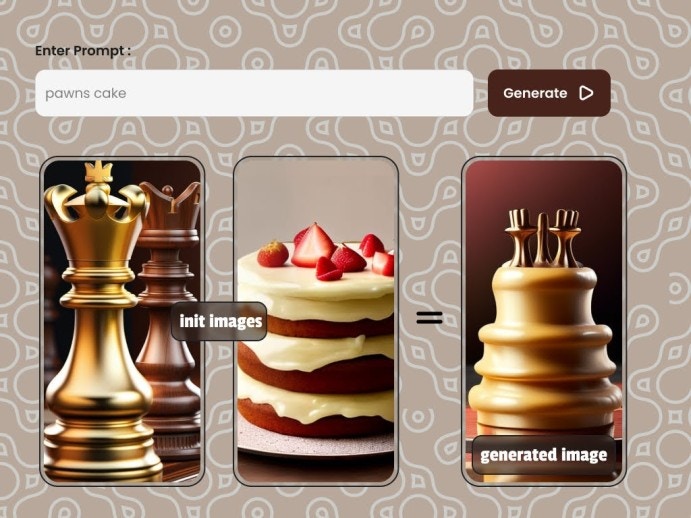
Request
Make aPOST request to below endpoint and pass the required parameters as a request body to the endpoint.
--request POST 'https://modelslab.com/api/v6/image_editing/img_mixer' \
Body
{
    "key":"",
    "seed":12345,
    "init_image":[
        "https://assets.modelslab.ai/generations/063c90e1-1740-410c-be84-23d379dcfee2",
        "https://assets.modelslab.ai/generations/8205b5be-c212-4a3e-ba74-3c824b8acc25"
        ],
    "prompt":"rose man",
    "negative_prompt":"A polluted city",
    "width":800,
    "height":600,
    "guidance_scale":10,
    "steps":41,
    "samples":1
}
Body
Your API Key used for request authorization
Text prompt with description of the things you want in the image
An array of image URLs to mix
4Items you don't want in the image
The width of the generated images, If not provided, the width of init_image is used
x <= 1024The height of the generated images, If not provided, the height of init_image is used
x <= 1024Number of denoising steps
1 <= x <= 50Scale for classifier-free guidance
1 <= x <= 20Seed used to reproduce results
Number of images to be returned in response
x <= 1URL to receive POST API call when complete
ID for webhook identification
Response
Image mixer response
- Option 1
- Option 2
- Option 3
success Time taken to generate the image in seconds
Unique identifier for the generation request
Array of generated image URLs
Array of proxy image URLs
Metadata about the generation process
Was this page helpful?