POST
/
image_editing
/
inpaint
Image inpainting
curl --request POST \
  --url https://modelslab.com/api/v6/image_editing/inpaint \
  --header 'Content-Type: application/json' \
  --data '
{
  "key": "<string>",
  "prompt": "<string>",
  "init_image": "<string>",
  "mask_image": "<string>",
  "negative_prompt": "<string>",
  "width": 512,
  "height": 512,
  "samples": 1,
  "num_inference_steps": 30,
  "safety_checker": "no",
  "guidance_scale": 5,
  "strength": 0.7,
  "instant_response": "false",
  "base64": "false",
  "seed": 123,
  "webhook": "<string>",
  "track_id": 123
}
'
{
  "status": "success",
  "generationTime": 123,
  "id": 123,
  "output": [
    "<string>"
  ],
  "proxy_links": [
    "<string>"
  ],
  "meta": {}
}

Documentation Index

Fetch the complete documentation index at: https://docs.modelslab.com/llms.txt

Use this file to discover all available pages before exploring further.

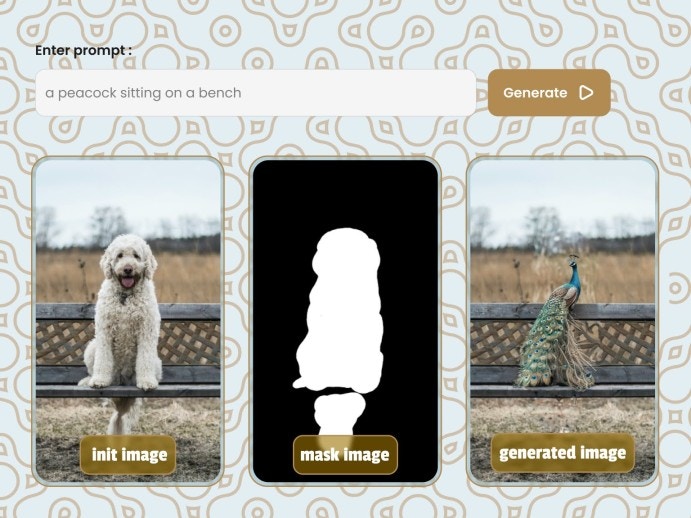
Together with the image and the mask you can add your description of the desired result by passing prompt and negative prompt.

Inpaintin

Inpainting endpoint result

Request

Make a POST request to below endpoint and pass the required parameters as a request body.
curl
--request POST 'https://modelslab.com/api/v6/image_editing/inpaint' \

Body

json
{  
    "key": "your_api_key",  
    "prompt": "a cat sitting on a bench",  
    "negative_prompt": null,  
    "init_image": "https://raw.githubusercontent.com/CompVis/stable-diffusion/main/data/inpainting_examples/overture-creations-5sI6fQgYIuo.png",  
    "mask_image": "https://raw.githubusercontent.com/CompVis/stable-diffusion/main/data/inpainting_examples/overture-creations-5sI6fQgYIuo_mask.png",  
    "width": "512",  
    "height": "512",  
    "samples": 1,  
    "num_inference_steps": "30",  
    "safety_checker": "no", 
    "guidance_scale": 5,  
    "strength": 0.7,  
    "base64": false,  
    "seed": null,  
    "webhook": null,  
    "track_id": null
}

Body

application/json
key
string
required

Your API Key used for request authorization

prompt
string
required

Text prompt describing the content you want in the generated image

init_image
string<uri>
required

Link to the initial image

mask_image
string<uri>
required

Link to the mask image for inpainting

negative_prompt
string

Items you do not want in the image

width
integer
default:512

The width of the generated images, If not provided, the width of init_image is used

Required range: x <= 1024
height
integer
default:512

The height of the generated images, If not provided, the height of init_image is used

Required range: x <= 1024
samples
integer
default:1

Number of images to be returned in response

Required range: x <= 4
num_inference_steps
integer
default:30

Number of denoising steps

safety_checker
enum<string>
default:no

A checker for NSFW images

Available options:
yes,
no
guidance_scale
integer
default:5

Scale for classifier-free guidance

Required range: 1 <= x <= 5
strength
number
default:0.7

Prompt strength when using the initial image

Required range: 0 <= x <= 1
instant_response
enum<string>
default:false

Set to true for instant queue response

Available options:
true,
false
base64
enum<string>
default:false

Set to true to get response as base64 string

Available options:
true,
false
seed
integer

Seed used to reproduce results

webhook
string<uri>

URL to receive POST API call when complete

track_id
integer

ID for webhook identification

Response

200 - application/json

Inpainting response

status
enum<string>
Available options:
success
generationTime
number

Time taken to generate the image in seconds

id
integer

Unique identifier for the generation request

output
string<uri>[]

Array of generated image URLs

Array of proxy image URLs

meta
object

Metadata about the generation process